
Overview
This material discusses the implementation of basic CRUD (Create, Read, Update, Delete) features using native PHP, MySQL, and Bootstrap as a CSS framework. Using Bootstrap helps create responsive and attractive application interfaces without having to write a lot of CSS code. This practicum aims to provide a basic understanding of data manipulation in databases through a clean and professional form interface.
Learning Outcomes
After completing this material, students are expected to be able to:
- Explains the basic concepts of CRUD and its application in web applications.
- Building form interfaces with Bootstrap.
- Integrate PHP with MySQL for data input, display, edit, and deletion processes.
- Implement basic form validation.
- Using a neat and easy to understand code structure.
Practical Material
What is CRUD
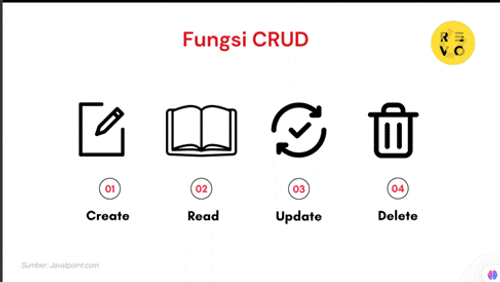
Before we delve deeper into how CRUD works, let's first take a look at what CRUD is in its essence. As mentioned earlier, CRUD stands for four key operations in data management:
- Create : Add new data.
- Read : Read or display existing data.
- Update : Update or change existing data.
- Delete : Deletes data from the system.
These four operations are essential elements in almost all data-driven applications, such as inventory management systems, financial applications, and even social media. For example, in social media applications, when we create an account (Create), view a profile (Read), update a status (Update), or delete a post (Delete), we are performing CRUD processes.
Why is CRUD so important?
CRUD not only simplifies data management but also ensures data integrity within applications. In the development world, the CRUD concept helps developers build efficient and easy-to-manage applications.
Function of each CRUD
Create
With the Create function, users can add new records or entries to a database . This function includes entering data into the database , creating new rows in a table, and specifying values for the attributes (columns) of that row. For example, when a user creates a new user account on a website , relevant information such as name, email address , and password is entered into the database .
Read
The Read function helps users retrieve or access existing data from a database , such as when searching for a specific record or retrieving all records that meet certain criteria. For example, when a user logs into a website , the application will perform a Read operation to access their account information from the database and display it on the screen.
Update
Updates allow users to change or edit existing data in the database . For example, if a user wants to change their email address or update certain information in their profile, the application will run an Update operation to change the relevant data in the database .
Delete
The Delete function allows users to remove unwanted data from the database . Therefore, when a user wants to delete their account on a website , the application will execute a Delete function to remove that data from the database .
How does CRUD work?
Once you understand what CRUD is , the next step is to understand how it works. Every application that uses CRUD will have functions or methods that support these four operations. How CRUD works is often determined by the programming language or framework used.
For example, in PHP , CRUD can be implemented through a MySQL database connection, using basic SQL queries. CRUD functions in PHP would include adding data to the database, reading data, updating existing data, and deleting data when it's no longer needed. This CRUD example could be applied to applications such as inventory systems, product catalogs, or user lists.
Here is a simple overview of how CRUD works:
- Create : User enters new data into the database.
- Read : Data stored in the database is displayed to the user.
- Update : Users can change existing data.
- Delete : Data that is no longer needed can be deleted.
Practical Steps
The following are the steps for creating CRUD with native PHP:
1. Prepare the database
CREATE TABLE mahasiswa (
    id INT AUTO_INCREMENT PRIMARY KEY,
    nama VARCHAR(100),
    nim VARCHAR(20)
);
2. Database Connection (connection/db.php)
<?php

$host = "localhost";
$user = "root";
$pass = "";
$db = "Latihan_login_db ";

$conn = mysqli_connect($host, $user, $pass, $db);

if (!$conn) {
    die("Koneksi gagal: " . mysqli_connect_error());

}
3. Displaying Data (index.php)
<?php include "koneksi/db.php"; ?>

<!DOCTYPE html>

<html lang="en">

<head>

  <title>Data Mahasiswa</title>

  <link href="https://cdn.jsdelivr.net/npm/[email protected]/dist/css/bootstrap.min.css" rel="stylesheet">

</head>

<body class="container mt-5">

  <h2>Data Mahasiswa</h2>

  <a href="tambah.php" class="btn btn-primary mb-3">+ Tambah Mahasiswa</a>

  <table class="table table-bordered">

    <thead class="table-dark">

      <tr><th>No</th><th>Nama</th><th>NIM</th><th>Aksi</th></tr>

    </thead>

    <tbody>

      <?php

      $no = 1;

      $result = mysqli_query($conn, "SELECT \* FROM mahasiswa");

      while ($row = mysql_fetc_assoc($result)) {

        echo "<tr>

                <td>$no</td>

                <td>{$row['nama']}</td>

                <td>{$row['nim']}</td>

                <td>

                  <a href='edit.php?id={$row['id']}' class='btn btn-warning btn-sm'>Edit</a>

                  <a href='hapus.php?id={$row['id']}' class='btn btn-danger btn-sm' onclick='return confirm("Hapus data ini?")'>Hapus</a>

                </td>

              </tr>";

        $no++;

      }

      ?>

    </tbody>

  </table>

</body>

</html>
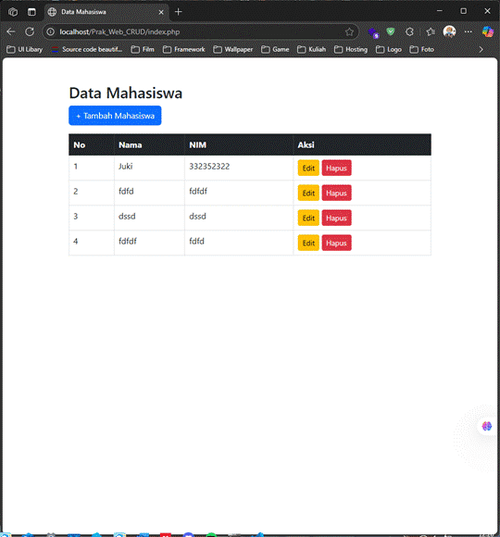
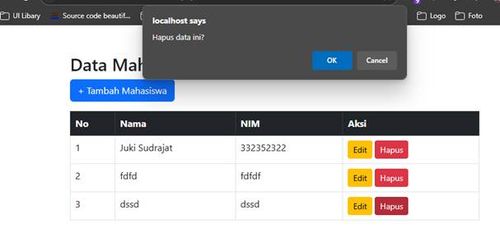
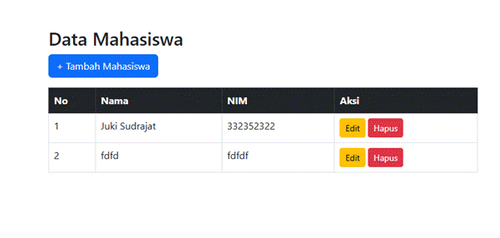
The next step is to create a main page (index.php) that displays all student data from the database. On this page, we use the SELECT * FROM student query to retrieve all data. The query results are then displayed in an HTML table designed with Bootstrap for a clean and responsive appearance. Each row of data has "Edit" and "Delete" buttons that lead to the edit.php and delete.php pages, respectively, using the id as a parameter. This page represents the Read operation in the CRUD concept.
4. Adding Data (add.php
<?php include "koneksi/db.php"; ?>

<!DOCTYPE html>

<html lang="en">

<head>

  <title>Tambah Mahasiswa</title>

  <link href="https://cdn.jsdelivr.net/npm/[email protected]/dist/css/bootstrap.min.css" rel="stylesheet">

</head>

<body class="container mt-5">

  <h2>Tambah Data Mahasiswa</h2>

  <form method="POST">

    <div class="mb-3">

      <label>Nama</label>

      <input type="text" name="nama" class="form-control" required>

    </div>

    <div class="mb-3">

      <label>NIM</label>

      <input type="text" name="nim" class="form-control" required>

    </div>

    <button type="submit" name="simpan" class="btn btn-success">Simpan</button>

    <a href="index.php" class="btn btn-secondary">Kembali</a>

  </form>

  <?php

  if (isset($_POST['simpan'])) {

      $nama = $_POST['nama'];

      $nim = $_POS['nim'];

      mysqli\_query($conn, "INSERT INTO mahasiswa (nama, nim) VALUES ('$nama', '$nim')");

      echo "<div class='alert alert-success mt-3'>Data berhasil disimpan.</div>

      <script>

      alert('Data Berhasil Ditambah')

      window.location.href = 'index.php'

      </script>

      ";

  }

  ?>

</body>

</html>
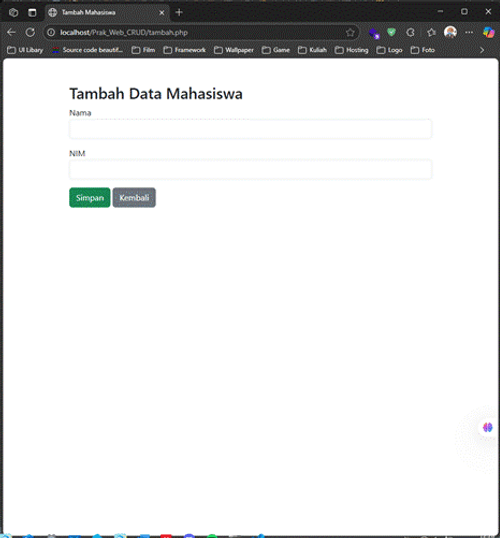
To add new data, a page is created, adding.php, which displays an input form containing two fields: the student's name and student ID number. When the form is submitted, PHP processes the input using the POST method. The input values are then entered into the database using the INSERT INTO student (name, student ID number) VALUES (...) query. Upon success, the system displays a confirmation message that the data has been saved. This is an implementation of the Create function in CRUD
5. Editing Data (edit.php)
<?php

include "koneksi/db.php";

$id = $_GET['id'];

$data = mysqli_fetch_assoc(mysqli_query($conn, "SELECT * FROM mahasiswa WHERE id=$id"));

?>

<!DOCTYPE _html_>

<html _lang_="en">

<head>

  <title>Edit Mahasiswa</title>

  <link _href_="https://cdn.jsdelivr.net/npm/[email protected]/dist/css/bootstrap.min.css" _rel_="stylesheet">

</head>

<body _class_="container mt-5">

  <h2>Edit Data Mahasiswa</h2>

  <form _method_="POST">

    <div _class_="mb-3">

      <label>Nama</label>

      <input _type_="text" _name_="nama" _class_="form-control" _value_="<?= $data['nama'] ?>" _required_>

    </div>

    <div _class_="mb-3">

      <label>NIM</label>

      <input _type_="text" _name_="nim" _class_="form-control" _value_="<?= $data['nim'] ?>" _required_>

    </div>

    <button type="submit" name="update" class="btn btn-warning">Update</button>

    <a _href_="index.php" _class_="btn btn-secondary">Kembali</a>

  </form>

  <?php

  if (isset($_POST['update'])) {

      $nama = $_POST['nama'];

      $nim  = $_POST['nim'];

      mysqli_query($conn, "UPDATE mahasiswa SET nama='$nama', nim='$nim' WHERE id=$id");

      echo "<div class='alert alert-success mt-3'>Data berhasil diupdate.</div>";

  }

  ?>

</body>

</html>
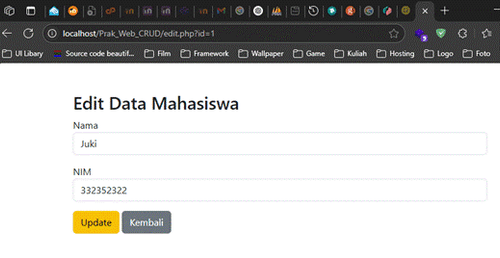
The edit.php page allows users to update previously entered student data. When the "Edit" button on the index.php page is clicked, the page receives the student ID via URL. Based on this ID, PHP queries the database to retrieve the old data to display in the form. Users can then change the values and click the "Update" button to save the changes. The UPDATE query is used to replace the name and student ID values based on the ID. This process implements the Update function in CRUD.
6. Delete student data (delete.php)
The final step in the CRUD flow is the data deletion process. When the user clicks the "Delete" button on the main page, the browser is redirected to delete.php containing the student ID.
In this page, PHP retrieves the ID and executes a DELETE FROM siswa WHERE id=... query to remove the data from the table. After the deletion is successful, the system immediately returns the user to the index.php page. This is an implementation of the Delete function in CRUD and is an effective way to manage outdated or incorrect data.
Here is a playlist reference for learning CRUD PHP Native (In Bahasa)
References
PHP and MySQL Tutorial: Creating a CRUD Application [New Student Registration Case Study]
What Is CRUD? Definition and Function of CRUD in Web Applications - CODEPOLITAN
What is CRUD? Meaning, Function, Examples, FAQs 2025 | RevoU