
Projekt einrichten
Bevor wir zum Hauptthema kommen, hier der von uns verwendete Technologie-Stack:
- Next.js
- Reagieren
- Spotify API
Next.js ist die beste Option, da wir unsere API-Schlüssel von Spotify nicht offenlegen.
1. API-Schlüssel erstellen
- Gehe zum Spotify-Entwicklerportal
- App erstellen
- Geben Sie den Namen der App ein.
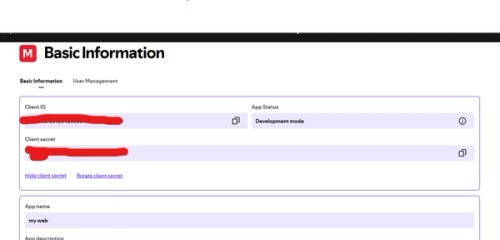
Anschließend erhalten Sie die Client-ID und das Client-Geheimnis.
WICHTIG: GEBEN SIE DIES NIEMANDEM WEITER
Danach sollte die Weiterleitung auf http://localhost:3000 eingestellt werden.
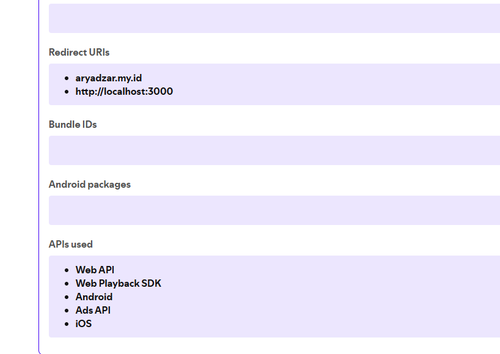
Der erste Schritt ist getan, wir fahren mit dem nächsten Schritt fort.
2. Authentifizieren Sie Ihr Konto
Zur Authentifizierung verwenden wir im ersten Schritt den Spotify-Endpunkt wie folgt:
https://accounts.spotify.com/authorize?client_id=CLIENT_ID_HERE&response_type=code&redirect_uri=http://localhost:3000&scope=user-read-currently-playing
Danach erhalten Sie Folgendes:
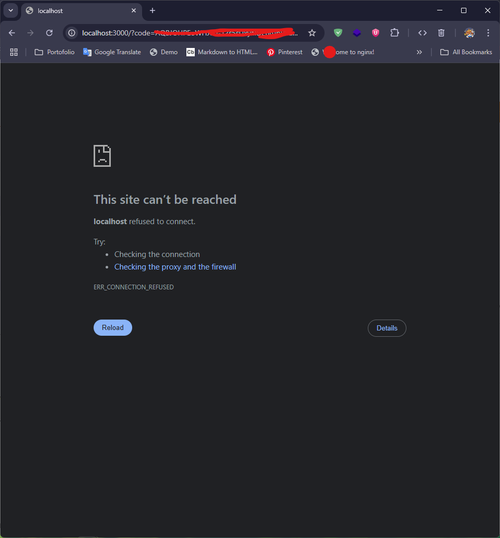
Die URL sieht folgendermaßen aus:
http://localhost:3000/?code=AQBJOHPEoWHJcU-12s5sUxyaIDEnnJpPSukx4JIIlAcHxVLM-QS30k5YPeF_137H-kuZfgdGQmETgEleU2zB3NjiWk7ZaAmyHjZ9c5iLR7Xsdqn8JBgQQaT6UDnNzFznaTFDVHwP2yO0y_5AIIjhxSOO3z4xSLrgIk2Ue1mIhPGmvPvyn6p5Prwttl83UnAFFOZIvbS7
Nach dem Kopierencode= .
Als Nächstes besorgen wir uns den Autorisierungsclient mit Base64-Verschlüsselung. Verwenden Sie diese Website zur Verschlüsselung im folgenden Format:client_id:client_secret
Zum Beispiel :
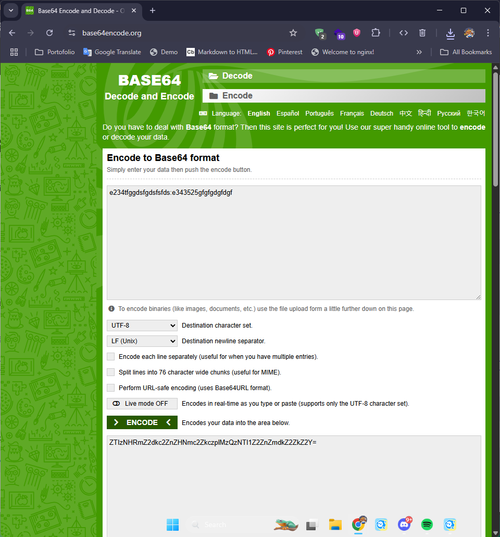
Kopieren Sie anschließend die Base64-kodierte Datei und senden Sie diese mit dem zuvor erhaltenen Code an den Endpunkt:
curl -H "Authorization: Basic CHANGE_BASE64_HERE"
-d grant_type=authorization_code -d code=CHANGE_CODE_HERE -d redirect_uri=http%3A
%2F%2Flocalhost:3000 https://accounts.spotify.com/api/token
*Bitte notieren Sie dies in einer Zeile.
Anschließend erhalten Sie dieses Beispiel-JSON.
{
  "access_token": "BQDKxO7h1I1wA3esGK9zCFWn97XORJEPjwAHAEIxCnDXcmy9GbEuPacquwWvpiM4d33gJVHVOP9KUxY8AXkpXc-_zRFZBfneHM2vEeV1Fbfr-0Mw94oimlNf77dRiyxPpm4IUVNLloUWgYcfkAO0",
  "token_type": "Bearer",
  "expires_in": 3600,
  "refresh_token": "AQAtxXvnzRTt4c2-2_Av2WyJQKWxUW_hMVN6QNiqv2i8A2ZElVarmvdhqyc8Pf-Z5n827FTFxTpHq5E3kOsrlRWM3TuJWxjVQsW0icR0zo3BXRFLt2FB2Qfj-pFaZwY-qc8",
  "scope": "user-read-currently-playing"
}
Wir werden das Refresh-Token verwenden und es in unsere Backend-API integrieren.
3. Backend-API erstellen
Installieren Sie next.js:
npx create-next-app@latest
Ihre Ordnerstruktur sieht folgendermaßen aus:
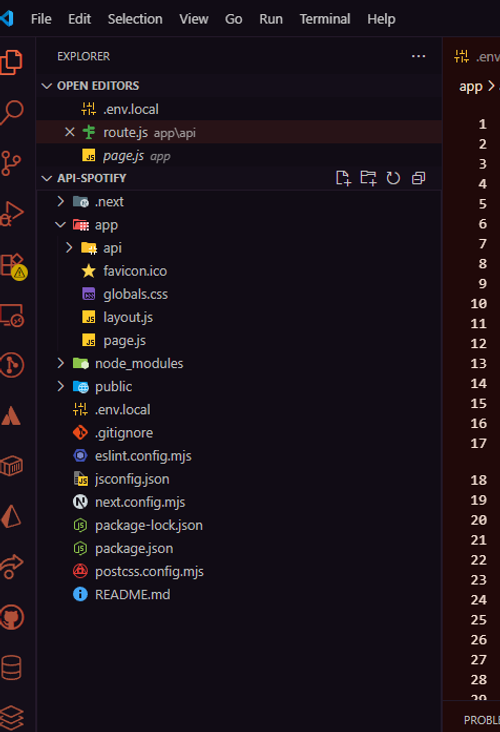
Kopieren Sie diesen Code in den Ordnerapp/api/route.js
import { NextResponse } from 'next/server';

const {
  SPOTIFY_CLIENT_ID: client_id,
  SPOTIFY_CLIENT_SECRET: client_secret,
  SPOTIFY_REFRESH_TOKEN: refresh_token,
} = process.env;

const basic = Buffer.from(`${client_id}:${client_secret}`).toString('base64');
const TOKEN_ENDPOINT = 'https://accounts.spotify.com/api/token';
const NOW_PLAYING_ENDPOINT = 'https://api.spotify.com/v1/me/player/currently-playing';

//example the link to the domain we allowed for
const allowedOrigins = [
  'http://localhost:5173',
  "http://localhost:3000"
]

//Get the access token form the spotify endpoint
async function getAccessToken() {
  const response = await fetch(TOKEN_ENDPOINT, {
    method: 'POST',
    headers: {
      Authorization: `Basic ${basic}`,
      'Content-Type': 'application/x-www-form-urlencoded',
    },
    body: new URLSearchParams({
      grant_type: 'refresh_token',
      refresh_token,
    }),
  });

  if (!response.ok) {
    console.error('Failed to refresh token');
    return null;
  }

  return response.json();
}

async function getNowPlaying(access_token) {
  return await fetch(NOW_PLAYING_ENDPOINT, {
    headers: {
      Authorization: `Bearer ${access_token}`,
    },
  });
}

export async function GET(request) {
  const origin = request.headers.get("origin") || ""

  const token = await getAccessToken();
  if (!token?.access_token) {
    return NextResponse.json({ isPlaying: false }, {
      status: 500,
      headers: {
        "Access-Control-Allow-Origin": allowedOrigins.includes(origin) ? origin : "",
        "Content-Type": "application/json",
      },
    });
  }

  const response = await getNowPlaying(token.access_token);

  if (response.status === 204 || response.status > 400) {
    return NextResponse.json({ isPlaying: false }, {
      status: 200,
      headers: {
        "Access-Control-Allow-Origin": allowedOrigins.includes(origin) ? origin : "",
        "Content-Type": "application/json",
      },
    });
  }

  const song = await response.json();

  if (song?.currently_playing_type !== 'track') {
    return NextResponse.json({ isPlaying: false }, {
      status: 200,
      headers: {
        "Access-Control-Allow-Origin": allowedOrigins.includes(origin) ? origin : "",
        "Content-Type": "application/json",
      },
    });
  }

  const data = {
    isPlaying: song.is_playing,
    title: song.item.name,
    album: song.item.album.name,
    artist: song.item.album.artists.map((a) => a.name).join(', '),
    albumImageUrl: song.item.album.images[0].url,
    songUrl: song.item.external_urls.spotify,
  };

  return NextResponse.json(data, {
    status: 200,
    headers: {
      "Access-Control-Allow-Origin": allowedOrigins.includes(origin) ? origin : "",
      "Content-Type": "application/json",
    },
  });
}

export async function OPTIONS(request) {
  const origin = request.headers.get("origin") || ""

  return new NextResponse(null, {
    status: 204,
    headers: {
      "Access-Control-Allow-Origin": allowedOrigins.includes(origin) ? origin : "",
      "Access-Control-Allow-Methods": "GET, OPTIONS",
      "Access-Control-Allow-Headers": "Content-Type, Authorization",
    },
  })
}
Füge die Datei mit dieser Variable zum Ordner .env hinzu.
SPOTIFY_CLIENT_ID=your-client-id
SPOTIFY_CLIENT_SECRET=your-client-secret
SPOTIFY_REFRESH_TOKEN=your-refresh-token
4. API-Übersicht
Dies ist ein Beispiel für die Verwendung der API (in diesem Beispiel verwende ich React als Beispiel für die Verwendung der API):
  useEffect(() => {
    const fetchTrack = async () => {
      try {
        const response = await axios.get(`/api`)
        const data = response.data

        const newTrack: SpotifyTrack = {
          name: data.title,
          artist: data.artist,
          album: data.album,
          image: data.albumImageUrl,
          isPlaying: data.isPlaying,
          externalUrl: data.songUrl,
        }

        setTrack(newTrack)
      } catch (error) {
        console.error("Gagal mengambil data Spotify:", error)
      } finally {
        setIsLoading(false)
      }
    }

    fetchTrack()
  }, [])

  if (isLoading) {
    return (
      <motion.div
        className="flex items-center gap-3 p-4 bg-gray-800/50 backdrop-blur-sm rounded-2xl border border-gray-700/50"
        initial={{ opacity: 0, scale: 0.9 }}
        animate={{ opacity: 1, scale: 1 }}
        transition={{ duration: 0.5 }}
      >
        <div className="w-12 h-12 bg-gray-700 rounded-lg animate-pulse" />
        <div className="flex-1">
          <div className="h-4 bg-gray-700 rounded animate-pulse mb-2" />
          <div className="h-3 bg-gray-700 rounded animate-pulse w-2/3" />
        </div>
      </motion.div>
    )
Anschließend konfigurieren wir die Daten, die wir von unserer erstellten API (aus dem useState) erhalten, entsprechend unseren Anforderungen:
      <motion.a
        href={track.externalUrl}
        target="_blank"
        rel="noopener noreferrer"
        className="flex items-center gap-3 p-4 bg-gradient-to-r from-green-900/20 to-gray-800/50 backdrop-blur-sm rounded-2xl border border-green-500/20 hover:border-green-500/50 transition-all duration-300 group-hover:scale-[1.02]"
        whileHover={{ y: -2 }}
        whileTap={{ scale: 0.98 }}
      >
        {/* Album Art */}
        <div className="relative">
          <motion.img
            src={track.image}
            alt={track.album}
            className="w-12 h-12 rounded-lg object-cover"
            animate={{ rotate: track.isPlaying ? [0, 360] : 0 }}
            transition={{
              duration: 10,
              repeat: track.isPlaying ? Number.POSITIVE_INFINITY : 0,
              ease: "linear",
            }}
          />
          {track.isPlaying && (
            <motion.div
              className="absolute -inset-1 bg-green-500/20 rounded-lg blur-sm"
              animate={{ opacity: [0.5, 1, 0.5] }}
              transition={{ duration: 2, repeat: Number.POSITIVE_INFINITY }}
            />
          )}
        </div>

        {/* Track Info */}
        <div className="flex-1 min-w-0">
          <div className="flex items-center gap-2 mb-1">
            <motion.div
              className="flex gap-1"
              animate={{ opacity: track.isPlaying ? [0.5, 1, 0.5] : 1 }}
              transition={{ duration: 1.5, repeat: track.isPlaying ? Number.POSITIVE_INFINITY : 0 }}
            >
              {[...Array(3)].map((_, i) => (
                <motion.div
                  key={i}
                  className="w-1 bg-green-500 rounded-full"
                  animate={{
                    height: track.isPlaying ? [4, 12, 4] : 4,
                  }}
                  transition={{
                    duration: 0.8,
                    repeat: track.isPlaying ? Number.POSITIVE_INFINITY : 0,
                    delay: i * 0.1,
                  }}
                />
              ))}
            </motion.div>
            <span className="text-xs text-green-400 font-medium">
              {track.isPlaying ? "Now Playing" : "Last Played"}
            </span>
          </div>

          <h4 className="text-white font-medium text-sm truncate group-hover:text-green-400 transition-colors">
            {track.name}
          </h4>
          <p className="text-gray-400 text-xs truncate">by {track.artist}</p>
        </div>

        {/* Spotify Icon */}
        <motion.div
          className="text-green-500"
          whileHover={{ scale: 1.1, rotate: 5 }}
          transition={{ type: "spring", stiffness: 300 }}
        >
          <svg className="w-6 h-6" viewBox="0 0 24 24" fill="currentColor">
            <path d="M12 0C5.4 0 0 5.4 0 12s5.4 12 12 12 12-5.4 12-12S18.66 0 12 0zm5.521 17.34c-.24.359-.66.48-1.021.24-2.82-1.74-6.36-2.101-10.561-1.141-.418.122-.779-.179-.899-.539-.12-.421.18-.78.54-.9 4.56-1.021 8.52-.6 11.64 1.32.42.18.479.659.301 1.02zm1.44-3.3c-.301.42-.841.6-1.262.3-3.239-1.98-8.159-2.58-11.939-1.38-.479.12-1.02-.12-1.14-.6-.12-.48.12-1.021.6-1.141C9.6 9.9 15 10.561 18.72 12.84c.361.181.54.78.241 1.2zm.12-3.36C15.24 8.4 8.82 8.16 5.16 9.301c-.6.179-1.2-.181-1.38-.721-.18-.601.18-1.2.72-1.381 4.26-1.26 11.28-1.02 15.721 1.621.539.3.719 1.02.42 1.56-.299.421-1.02.599-1.559.3z" />
          </svg>
        </motion.div>
      </motion.a>
Referenz
https://theodorusclarence.com/blog/spotify-now-playing