
Tech Stack
The tech stack I used to build the url shortener is as follows:
- Next JS 16.1.1
- Prisma (ORM database)
- Neon Database Postgresql (optional)
- Auth JS as authentication
- Login with Google as authentication
Prisma Schema
The following is the prism schema that I made :
generator client {
  provider = "prisma-client-js"
}

datasource db {
  provider = "postgresql"
  url      = env("DATABASE_URL")
}

model User {
  id            String    @id @default(cuid())
  name          String?
  email         String?   @unique
  emailVerified DateTime?
  image         String?
  password      String?
  accounts      Account[]
  createdAt     DateTime  @default(now())
  updatedAt     DateTime  @updatedAt
  links         Link[]
}

model Account {
  userId            String
  type              String
  provider          String
  providerAccountId String
  refresh_token     String?
  access_token      String?
  expires_at        Int?
  token_type        String?
  scope             String?
  id_token          String?
  session_state     String?

  createdAt DateTime @default(now())
  updatedAt DateTime @updatedAt

  user User @relation(fields: [userId], references: [id], onDelete: Cascade)

  @@id([provider, providerAccountId])
}

model Link {
  id          String  @id @default(cuid())
  key         String  @unique // short code (abc123)
  url         String // destination URL
  title       String?
  description String?

  password  String?
  expiresAt DateTime?

  workspaceId String

  domainId String?

  userId String
  user   User   @relation(fields: [userId], references: [id])

  clicks ClickEvent[]

  createdAt DateTime @default(now())
  updatedAt DateTime @updatedAt
}

model ClickEvent {
  id     String @id @default(cuid())
  linkId String
  link   Link   @relation(fields: [linkId], references: [id])

  ip      String?
  country String?
  city    String?
  device  String?
  browser String?
  os      String?
  referer String?

  createdAt DateTime @default(now())
}
ENV File
Here is the env file that I use:
DATABASE_URL=
AUTH_SECRET= # Added by `npx auth`. Read more: https://cli.authjs.dev
AUTH_GOOGLE_ID=
AUTH_GOOGLE_MAIL=
NEXT_PUBLIC_BASE_URL=
Specify a specific email address to use for authentication. This prevents you from logging in to Google with just any account. For more details, see the section on creating authentication.
Folder Structure
     2 ├───.gitignore
     3 ├───components.json
     4 ├───env.example
     5 ├───eslint.config.mjs
     6 ├───next.config.ts
     7 ├───package-lock.json
     8 ├───package.json
     9 ├───postcss.config.mjs
    10 ├───README.md
    11 ├───tsconfig.json
    12 ├───.git\...
    13 ├───.next\
    14 │   ├───build\...
    15 │   ├───cache\...
    16 │   ├───diagnostics\...
    17 │   ├───server\...
    18 │   ├───static\...
    19 │   └───types\...
    20 ├───.vercel\...
    21 ├───node_modules\...
    22 ├───prisma\
    23 │   ├───schema.prisma
    24 │   └───migrations\
    25 │       ├───migration_lock.toml
    26 │       └───20251217142145_migrate_1\
    27 │           └───migration.sql
    28 ├───public\
    29 │   ├───file.svg
    30 │   ├───globe.svg
    31 │   ├───menu.svg
    32 │   ├───next.svg
    33 │   ├───vercel.svg
    34 │   └───window.svg
    35 └───src\
    36     ├───auth.config.ts
    37     ├───auth.ts
    38     ├───middleware.ts
    39     ├───routes.ts
    40     ├───actions\
    41     │   ├───links.ts
    42     │   ├───login.ts
    43     │   └───register.ts
    44     ├───app\
    45     │   ├───favicon.ico
    46     │   ├───globals.css
    47     │   ├───layout.tsx
    48     │   ├───page.tsx
    49     │   ├───(auth)\
    50     │   │   ├───layout.tsx
    51     │   │   └───auth\
    52     │   │       ├───(register)\
    53     │   │       │   └───page.tsx
    54     │   │       └───login\
    55     │   │           ├───page.tsx
    56     │   │           └───_components\
    57     │   │               └───login.tsx
    58     │   ├───(protected)\
    59     │   │   ├───layout.tsx
    60     │   │   └───dashboard\
    61     │   │       ├───page.tsx
    62     │   │       └───_components\
    63     │   │           └───dashboard.tsx
    64     │   ├───[key]\
    65     │   │   ├───page.tsx
    66     │   │   ├───redirect-page.tsx
    67     │   │   └───detail\
    68     │   │       ├───client.tsx
    69     │   │       └───page.tsx
    70     │   └───api\
    71     │       ├───auth\
    72     │       │   └───[...nextauth]\
    73     │       │       └───route.ts
    74     │       ├───links\
    75     │       │   └───route.ts
    76     │       └───verify-turnstile\
    77     │           └───route.ts
    78     ├───components\
    79     │   ├───auth\
    80     │   │   ├───form-create-link.tsx
    81     │   │   ├───form-edit-link.tsx
    82     │   │   ├───form-login.tsx
    83     │   │   └───form-register.tsx
    84     │   ├───common\
    85     │   │   ├───sidebar.tsx
    86     │   │   └───theme-toggle.tsx
    87     │   ├───dashboard\
    88     │   │   ├───columns.tsx
    89     │   │   └───data-table.tsx
    90     │   └───ui\
    91     │       ├───alert-dialog.tsx
    92     │       ├───button.tsx
    93     │       ├───card.tsx
    94     │       ├───dialog.tsx
    95     │       ├───dropdown-menu.tsx
    96     │       ├───form.tsx
    97     │       ├───input.tsx
    98     │   │   ├───label.tsx
    99     │   │   ├───sheet.tsx
   100     │   │   ├───sonner.tsx
   101     │   │   └───table.tsx
   102     ├───constants\
   103     │   └───register-constant.tsx
   104     ├───data\
   105     │   └───user.ts
   106     ├───lib\
   107     │   ├───db.ts
   108     │   ├───getBaseUrl.ts
   109     │   └───utils.ts
   110     ├───provider\
   111     │   ├───react-query-provider.tsx
   112     │   └───theme-provider.tsx
   113     ├───types\
   114     │   └───auth.d.ts
   115     └───validations\
   116         └───auth-validation.ts
Creating Authentication
As I mentioned in my tech stack, I use auth.js as my primary authentication for security. Here's my auth.js setup:
import Google from "next-auth/providers/google";

export default {
  providers: [
    Google
  ],
} satisfies NextAuthConfig;
import NextAuth, { DefaultSession } from "next-auth";
import authConfig from "./auth.config";
import { PrismaAdapter } from "@auth/prisma-adapter";
import { db } from "./lib/db";
export const { handlers, signIn, signOut, auth } = NextAuth({
adapter: PrismaAdapter(db),
callbacks: {
async signIn({ user }) {
const allowedEmail = process.env.AUTH_GOOGLE_MAIL;
if (!allowedEmail) return false;
// hanya email yang diizinkan
if (user.email !== allowedEmail) {
return false;
}
return true;
},
async session({ session, token }) {
if (session.user) {
session.user.id = token.sub as string;
session.user.email = token.email as string;
session.user.name = token.name as string;
session.user.image = token.picture as string;
}
return session;
},
async jwt({ token }) {
return token;
},
},
session: {
strategy: "jwt",
},
pages: {
signIn: "/auth/login",
error: "/auth/login",
},
...authConfig,
});In the sign in section, users can only log in by using a specific email that has been set in their .env.
Creating a Unique Code
Here I use nanoid to generate it
<FormField
  control={form.control}
  name="key"
  render={({ field }) => (
    <FormItem>
      <FormLabel>Custom Key (Optional)</FormLabel>
      <FormControl>
        <div className="flex items-center space-x-2">
          <Input
            placeholder="my-custom-link"
            {...field}
            disabled={isPending}
          />
          {/* Generate Kode Unik nya */}
          <Button
            type="button"
            variant="outline"
            onClick={() => form.setValue("key", nanoid(7))}
            disabled={isPending}
          >
            Generate
          </Button>
        </div>
      </FormControl>
      <FormMessage />
    </FormItem>
  )}
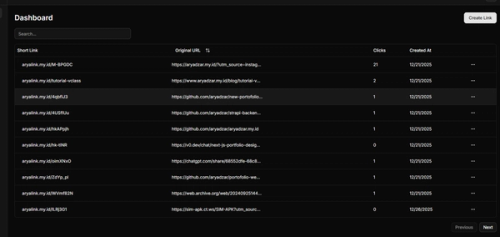
Preview Table
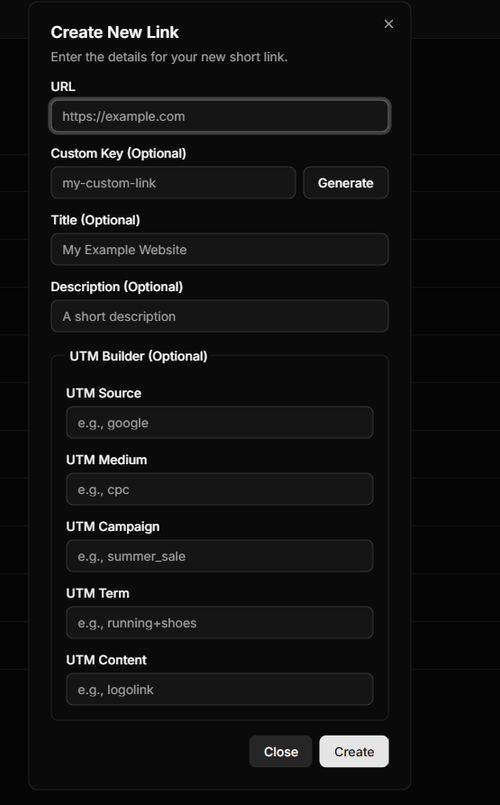
Create Link Form
Here is the form to create a link on this project in the route/dashboard
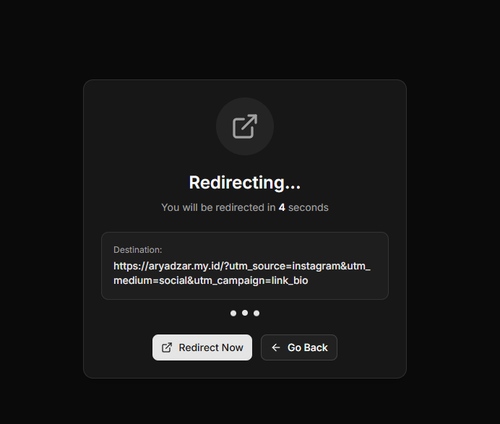
Redirect Original Page URL
The project can be accessed at the link below.