
Set Up Project
Before we start the main topic, here the tech stack we use :
- Next JS
- React
- Spotify API
Next JS is the best option to use cause we dont expose our API keys from spotify
1. Create API keys
- Go to spotify developer
- Create an App
- Fill the name of App
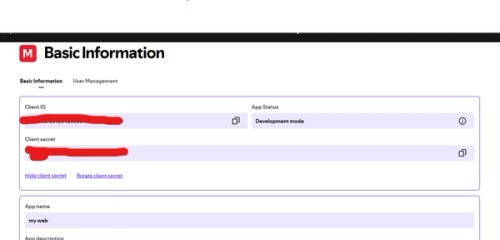
After that, u'll get the Client ID and the Client Secret
REMEMBER : DONT GIVE THIS TO ANYONE
After that, set the redirect to http://localhost:3000
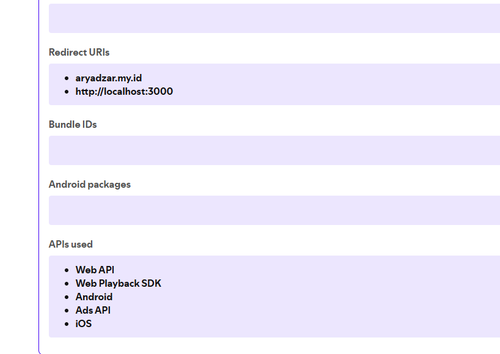
The first step is done, we will continue to the next step
2. Authenticate Your Account
To do the authenticaation, first step we do the endpoint from the spotify in this below :
https://accounts.spotify.com/authorize?client_id=CLIENT_ID_HERE&response_type=code&redirect_uri=http://localhost:3000&scope=user-read-currently-playing
After that you will get this
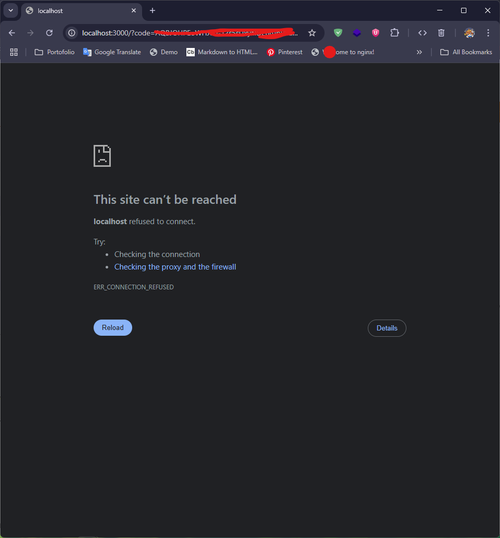
The URL will be like this :
http://localhost:3000/?code=AQBJOHPEoWHJcU-12s5sUxyaIDEnnJpPSukx4JIIlAcHxVLM-QS30k5YPeF_137H-kuZfgdGQmETgEleU2zB3NjiWk7ZaAmyHjZ9c5iLR7Xsdqn8JBgQQaT6UDnNzFznaTFDVHwP2yO0y_5AIIjhxSOO3z4xSLrgIk2Ue1mIhPGmvPvyn6p5Prwttl83UnAFFOZIvbS7
Copy after code= .
Next, we will get the authorization client with the base64 encrypted, use this website to encrypt with the format client_id:client_secret
For Example :
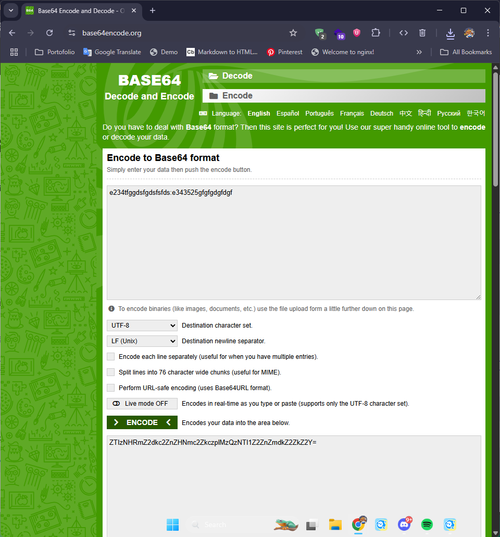
After that, copy the base64 we encrypted and do that to the endpoint with the code we got before below :
curl -H "Authorization: Basic CHANGE_BASE64_HERE"
-d grant_type=authorization_code -d code=CHANGE_CODE_HERE -d redirect_uri=http%3A
%2F%2Flocalhost:3000 https://accounts.spotify.com/api/token
*make sure write down with the one line
After that, you'll get this example json
{
  "access_token": "BQDKxO7h1I1wA3esGK9zCFWn97XORJEPjwAHAEIxCnDXcmy9GbEuPacquwWvpiM4d33gJVHVOP9KUxY8AXkpXc-_zRFZBfneHM2vEeV1Fbfr-0Mw94oimlNf77dRiyxPpm4IUVNLloUWgYcfkAO0",
  "token_type": "Bearer",
  "expires_in": 3600,
  "refresh_token": "AQAtxXvnzRTt4c2-2_Av2WyJQKWxUW_hMVN6QNiqv2i8A2ZElVarmvdhqyc8Pf-Z5n827FTFxTpHq5E3kOsrlRWM3TuJWxjVQsW0icR0zo3BXRFLt2FB2Qfj-pFaZwY-qc8",
  "scope": "user-read-currently-playing"
}
What we will take is the refresh token and we will integrate that with our Backend API
3. Make Backend API
Install next js :
npx create-next-app@latest
You structured folder will be like this :
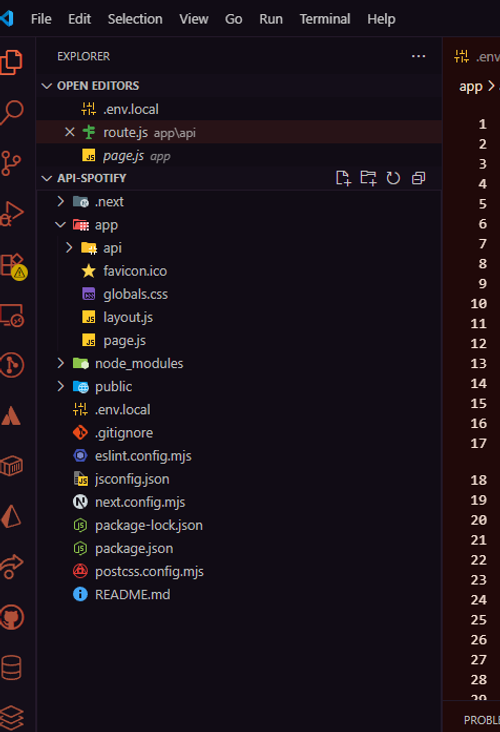
Copy this code into the folder app/api/route.js
import { NextResponse } from 'next/server';

const {
  SPOTIFY_CLIENT_ID: client_id,
  SPOTIFY_CLIENT_SECRET: client_secret,
  SPOTIFY_REFRESH_TOKEN: refresh_token,
} = process.env;

const basic = Buffer.from(`${client_id}:${client_secret}`).toString('base64');
const TOKEN_ENDPOINT = 'https://accounts.spotify.com/api/token';
const NOW_PLAYING_ENDPOINT = 'https://api.spotify.com/v1/me/player/currently-playing';

//example the link to the domain we allowed for
const allowedOrigins = [
  'http://localhost:5173',
  "http://localhost:3000"
]

//Get the access token form the spotify endpoint
async function getAccessToken() {
  const response = await fetch(TOKEN_ENDPOINT, {
    method: 'POST',
    headers: {
      Authorization: `Basic ${basic}`,
      'Content-Type': 'application/x-www-form-urlencoded',
    },
    body: new URLSearchParams({
      grant_type: 'refresh_token',
      refresh_token,
    }),
  });

  if (!response.ok) {
    console.error('Failed to refresh token');
    return null;
  }

  return response.json();
}

async function getNowPlaying(access_token) {
  return await fetch(NOW_PLAYING_ENDPOINT, {
    headers: {
      Authorization: `Bearer ${access_token}`,
    },
  });
}

export async function GET(request) {
  const origin = request.headers.get("origin") || ""

  const token = await getAccessToken();
  if (!token?.access_token) {
    return NextResponse.json({ isPlaying: false }, {
      status: 500,
      headers: {
        "Access-Control-Allow-Origin": allowedOrigins.includes(origin) ? origin : "",
        "Content-Type": "application/json",
      },
    });
  }

  const response = await getNowPlaying(token.access_token);

  if (response.status === 204 || response.status > 400) {
    return NextResponse.json({ isPlaying: false }, {
      status: 200,
      headers: {
        "Access-Control-Allow-Origin": allowedOrigins.includes(origin) ? origin : "",
        "Content-Type": "application/json",
      },
    });
  }

  const song = await response.json();

  if (song?.currently_playing_type !== 'track') {
    return NextResponse.json({ isPlaying: false }, {
      status: 200,
      headers: {
        "Access-Control-Allow-Origin": allowedOrigins.includes(origin) ? origin : "",
        "Content-Type": "application/json",
      },
    });
  }

  const data = {
    isPlaying: song.is_playing,
    title: song.item.name,
    album: song.item.album.name,
    artist: song.item.album.artists.map((a) => a.name).join(', '),
    albumImageUrl: song.item.album.images[0].url,
    songUrl: song.item.external_urls.spotify,
  };

  return NextResponse.json(data, {
    status: 200,
    headers: {
      "Access-Control-Allow-Origin": allowedOrigins.includes(origin) ? origin : "",
      "Content-Type": "application/json",
    },
  });
}

export async function OPTIONS(request) {
  const origin = request.headers.get("origin") || ""

  return new NextResponse(null, {
    status: 204,
    headers: {
      "Access-Control-Allow-Origin": allowedOrigins.includes(origin) ? origin : "",
      "Access-Control-Allow-Methods": "GET, OPTIONS",
      "Access-Control-Allow-Headers": "Content-Type, Authorization",
    },
  })
}
Add the to the folder .env with this variable
SPOTIFY_CLIENT_ID=your-client-id
SPOTIFY_CLIENT_SECRET=your-client-secret
SPOTIFY_REFRESH_TOKEN=your-refresh-token
4. API Overview
This the example using API that we make (this example, i'm using react as the example of using API) :
  useEffect(() => {
    const fetchTrack = async () => {
      try {
        const response = await axios.get(`/api`)
        const data = response.data

        const newTrack: SpotifyTrack = {
          name: data.title,
          artist: data.artist,
          album: data.album,
          image: data.albumImageUrl,
          isPlaying: data.isPlaying,
          externalUrl: data.songUrl,
        }

        setTrack(newTrack)
      } catch (error) {
        console.error("Gagal mengambil data Spotify:", error)
      } finally {
        setIsLoading(false)
      }
    }

    fetchTrack()
  }, [])

  if (isLoading) {
    return (
      <motion.div
        className="flex items-center gap-3 p-4 bg-gray-800/50 backdrop-blur-sm rounded-2xl border border-gray-700/50"
        initial={{ opacity: 0, scale: 0.9 }}
        animate={{ opacity: 1, scale: 1 }}
        transition={{ duration: 0.5 }}
      >
        <div className="w-12 h-12 bg-gray-700 rounded-lg animate-pulse" />
        <div className="flex-1">
          <div className="h-4 bg-gray-700 rounded animate-pulse mb-2" />
          <div className="h-3 bg-gray-700 rounded animate-pulse w-2/3" />
        </div>
      </motion.div>
    )
After that we're configuring the data we get from our made API (from the useState) to the our need :
      <motion.a
        href={track.externalUrl}
        target="_blank"
        rel="noopener noreferrer"
        className="flex items-center gap-3 p-4 bg-gradient-to-r from-green-900/20 to-gray-800/50 backdrop-blur-sm rounded-2xl border border-green-500/20 hover:border-green-500/50 transition-all duration-300 group-hover:scale-[1.02]"
        whileHover={{ y: -2 }}
        whileTap={{ scale: 0.98 }}
      >
        {/* Album Art */}
        <div className="relative">
          <motion.img
            src={track.image}
            alt={track.album}
            className="w-12 h-12 rounded-lg object-cover"
            animate={{ rotate: track.isPlaying ? [0, 360] : 0 }}
            transition={{
              duration: 10,
              repeat: track.isPlaying ? Number.POSITIVE_INFINITY : 0,
              ease: "linear",
            }}
          />
          {track.isPlaying && (
            <motion.div
              className="absolute -inset-1 bg-green-500/20 rounded-lg blur-sm"
              animate={{ opacity: [0.5, 1, 0.5] }}
              transition={{ duration: 2, repeat: Number.POSITIVE_INFINITY }}
            />
          )}
        </div>

        {/* Track Info */}
        <div className="flex-1 min-w-0">
          <div className="flex items-center gap-2 mb-1">
            <motion.div
              className="flex gap-1"
              animate={{ opacity: track.isPlaying ? [0.5, 1, 0.5] : 1 }}
              transition={{ duration: 1.5, repeat: track.isPlaying ? Number.POSITIVE_INFINITY : 0 }}
            >
              {[...Array(3)].map((_, i) => (
                <motion.div
                  key={i}
                  className="w-1 bg-green-500 rounded-full"
                  animate={{
                    height: track.isPlaying ? [4, 12, 4] : 4,
                  }}
                  transition={{
                    duration: 0.8,
                    repeat: track.isPlaying ? Number.POSITIVE_INFINITY : 0,
                    delay: i * 0.1,
                  }}
                />
              ))}
            </motion.div>
            <span className="text-xs text-green-400 font-medium">
              {track.isPlaying ? "Now Playing" : "Last Played"}
            </span>
          </div>

          <h4 className="text-white font-medium text-sm truncate group-hover:text-green-400 transition-colors">
            {track.name}
          </h4>
          <p className="text-gray-400 text-xs truncate">by {track.artist}</p>
        </div>

        {/* Spotify Icon */}
        <motion.div
          className="text-green-500"
          whileHover={{ scale: 1.1, rotate: 5 }}
          transition={{ type: "spring", stiffness: 300 }}
        >
          <svg className="w-6 h-6" viewBox="0 0 24 24" fill="currentColor">
            <path d="M12 0C5.4 0 0 5.4 0 12s5.4 12 12 12 12-5.4 12-12S18.66 0 12 0zm5.521 17.34c-.24.359-.66.48-1.021.24-2.82-1.74-6.36-2.101-10.561-1.141-.418.122-.779-.179-.899-.539-.12-.421.18-.78.54-.9 4.56-1.021 8.52-.6 11.64 1.32.42.18.479.659.301 1.02zm1.44-3.3c-.301.42-.841.6-1.262.3-3.239-1.98-8.159-2.58-11.939-1.38-.479.12-1.02-.12-1.14-.6-.12-.48.12-1.021.6-1.141C9.6 9.9 15 10.561 18.72 12.84c.361.181.54.78.241 1.2zm.12-3.36C15.24 8.4 8.82 8.16 5.16 9.301c-.6.179-1.2-.181-1.38-.721-.18-.601.18-1.2.72-1.381 4.26-1.26 11.28-1.02 15.721 1.621.539.3.719 1.02.42 1.56-.299.421-1.02.599-1.559.3z" />
          </svg>
        </motion.div>
      </motion.a>
Refrence
https://theodorusclarence.com/blog/spotify-now-playing